Next Up Tab
The Next Up card on a contact's page shows a timeline of everything scheduled to reach that contact, in the order it will happen. Open an active contact and find the Next Up card. The number in the card's header shows the number of upcoming events.
What it shows
The timeline lists the contact's scheduled events, which come from:
- Campaign events: A message or flow from a campaign the contact belongs to.
- Scheduled broadcasts: One-off messages set for a specific time.
- Scheduled flows: Flows triggered to start on a schedule.
Reading the timeline
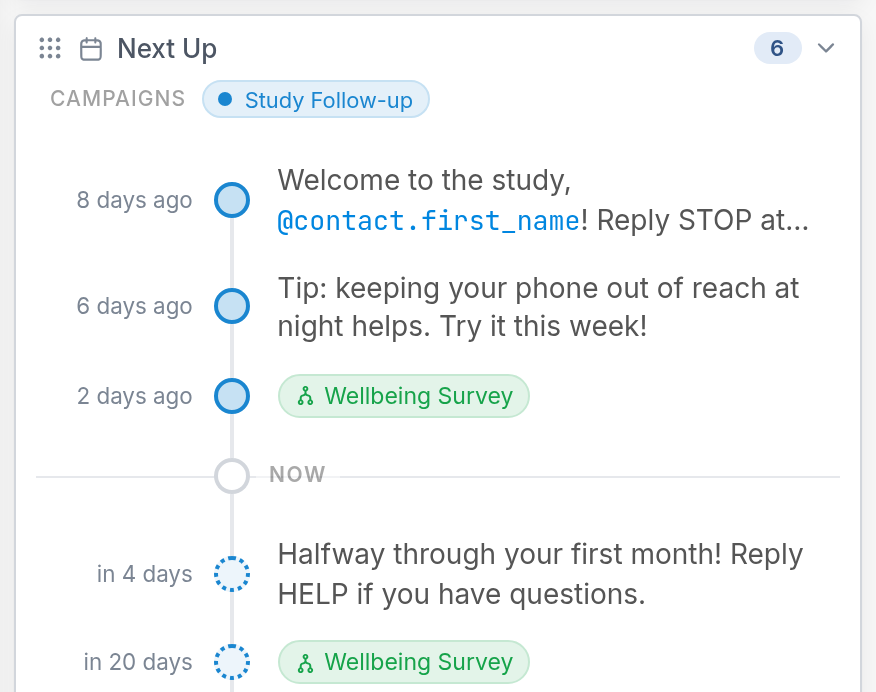
The campaigns the contact belongs to are listed at the top of the card, under CAMPAIGNS. The timeline is divided at NOW. Earlier entries appear above it, labeled by how long ago they happened, and upcoming entries appear below it, labeled by how far out they're scheduled. The timeline is a projection, so past entries may not match what actually happened. It updates automatically as events, schedules and contact fields change.